How Shopify Bot Traffic Skews Analytics (and Filters)
Shopify bot traffic analytics skew conversion when bot sessions inflate traffic without orders. Filter Human sessions in reports since October 2025—filtering is not blocking, and GA4 or ad pixels need separate hygiene.
Shopify labels each storefront session as human or bot and lets you add a Human or bot session dimension or filter in sessions-related Analytics reports (available from October 2025). Filtering bots cleans business reports—it does not block bot visits, retroactively reclassify old data, or remove bots from third-party pixels. Use human-only views for conversion decisions; keep total sessions for anomaly monitoring.
Why Does Bot Traffic Distort Shopify Analytics?
Automated crawlers, scrapers, monitoring tools, and low-quality referral bots generate Shopify bot traffic that browses without buying. Sessions rise while orders stay flat—so Shopify bot traffic analytics show a lower conversion rate even when real shopper behavior has not changed.
Merchants notice the symptom as 'traffic is up but sales are flat' or 'conversion collapsed overnight.' Before you redesign product pages or cut ad spend, determine how much traffic is human. This is an analytics hygiene problem, not a storefront speed problem—performance optimization is a separate diagnostic path.
What Is the Human or Bot Session Dimension?
Shopify tracks whether each online store session likely came from a human or a bot. You can surface that label in Analytics reports as a dimension and optionally filter to Human sessions only. Shopify announced this capability in the October 27, 2025 changelog; Help Center documentation describes applying it in the report configuration panel.
Important limitations Shopify documents: classification applies to sessions-related metrics on new data from October 2025 onward—it does not retroactively relabel older sessions. Bot detection is not available on Headless and Hydrogen storefronts. Some sophisticated automated traffic may classify late as patterns evolve.
What the dimension is not
Not a global store setting that removes bots from all dashboard cards by default.
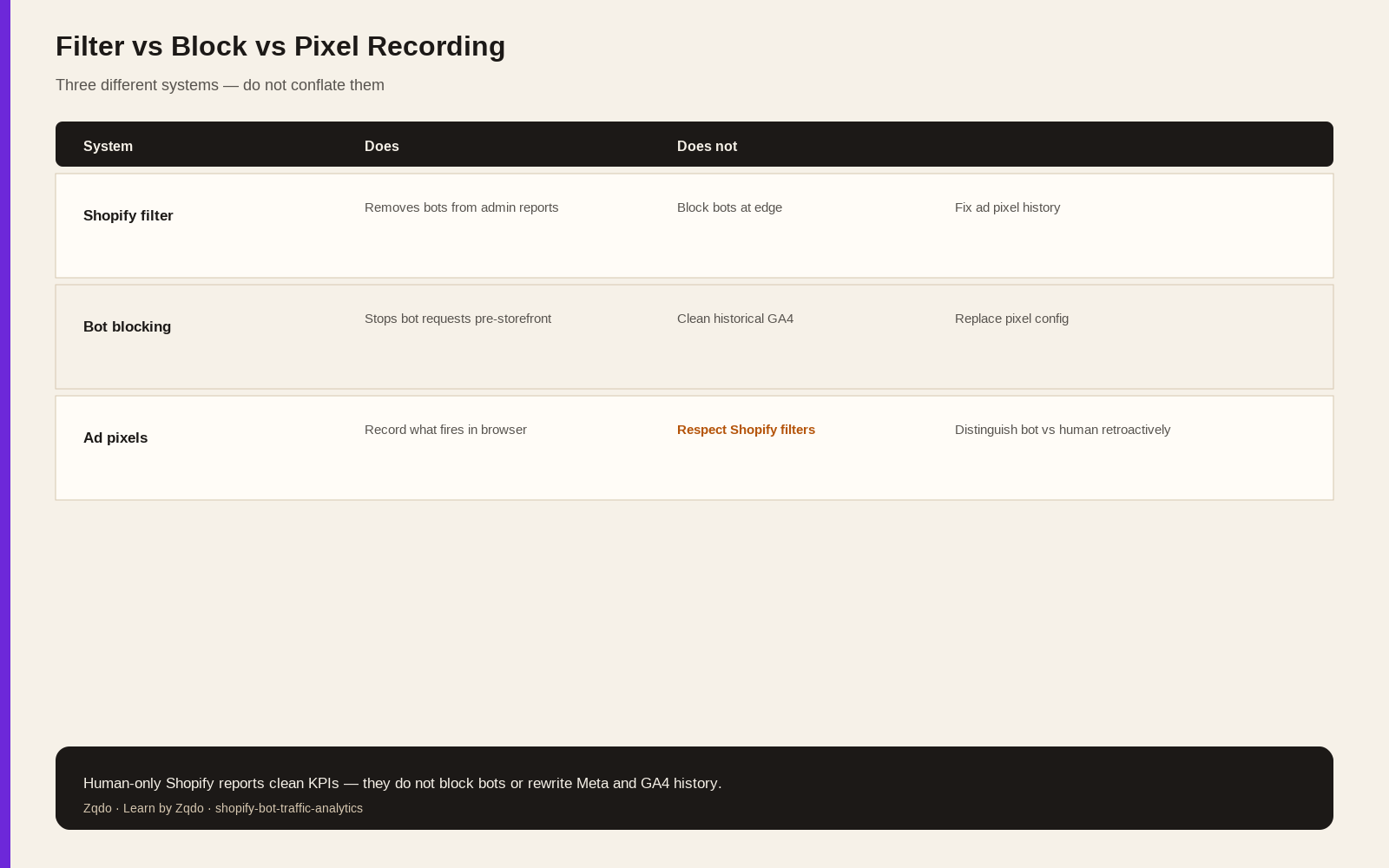
Not bot blocking—bots can still visit and trigger pixels.
Not a fix for GA4, Meta, or Google Ads reporting unless you configure those tools separately.
Not available on every report type—sessions-related metrics only.
How Do You Filter Bot Sessions in Shopify Reports?
Filtering is a per-report configuration. Nothing changes until you add the dimension or filter yourself.
Merchant-safe steps
From Shopify admin, go to Analytics > Reports.
Open a sessions-based report (sessions, conversion rate, online store visitors, etc.).
In the configuration panel, click + in Dimensions and select Human or bot session.
Optional: click + in Filters, choose Human or bot session, add value Human, and apply.
Save or pin the report for weekly reviews.
Developer and analyst steps
Developer or analyst step: in ShopifyQL queries for supported datasets, filter with human_or_bot_session = 'human' when building custom exports or scheduled reports. Compare human-only conversion rate to all-sessions conversion rate on the same date range—large gaps confirm bot skew.
Report view
Use for
Avoid using for
All sessions
Traffic anomaly alerts, bot spike monitoring
Campaign ROI decisions
Human sessions only
Conversion rate, landing page quality, CRO tests
Ignoring bot spikes that may signal attacks
Bot sessions only
Investigating scrapers or suspicious referrers
Merchandising or pricing decisions
Why Is Filtering Bots Different From Blocking Them?
Report filtering changes what you see in Shopify Analytics. Blocking changes whether automated clients can reach your storefront or complete actions. Shopify's human-session filter is intentionally conservative so legitimate crawlers that help discovery are not miscounted as malicious—but that also means some bots remain in human views until reclassified.
Merchant-safe blocking hygiene
Keep Shopify's hCaptcha enabled where offered—documented as platform-level checkout protection, not a report filter.
Review robots.txt and app installs after traffic spikes; do not block verified search crawlers without SEO review.
Use firewall or bot-management apps only when you have evidence of abuse, not because conversion math looks bad.
Developer caution
Developer step: if you add Cloudflare or edge bot scores, coordinate with SEO so organic crawl budget is not collateral damage. Blocking and filtering solve different problems—use human-only Shopify reports for KPIs and edge rules only for security or cost containment.
How Do Shopify, GA4, and Ad Pixels Disagree?
Human-only Shopify reports clean KPIs—they do not block bots or rewrite Meta and GA4 history.
Shopify's human filter cleans native session reports. GA4, Meta, TikTok, and other pixels maintain their own bot and session rules—and they may still record bot pageviews at fire time before Shopify classifies the session.
Merchant-safe reconciliation
Pick one primary source for Shopify conversion rate decisions—human-filtered Shopify reports.
Use GA4 for channel exploration, not as a 1:1 match to Shopify sessions.
Compare week-over-week direction, not absolute session parity.
If ad platforms show high clicks but human Shopify sessions are flat, audit UTM hygiene and landing URLs before blaming the product page.
Developer follow-through
Developer step: audit Customer events and web pixel implementations per the pixel tracking guide. Duplicate or legacy tags inflate events independent of Shopify bot labels. Fixing pixels is orthogonal to enabling human filters—do both when diagnosing attribution gaps.
When Should You Investigate Beyond the Filter?
After you apply human filters, persistent problems point to real CRO issues: weak product pages, trust gaps, checkout friction, or audience mismatch. Work those diagnostics only once human conversion rate—not bot-inflated totals—is your baseline.
Human conversion stable but revenue down → AOV, catalog, or inventory—not bot noise.
Human sessions flat, ad spend up → targeting or creative, not analytics classification.
Bot sessions dominate one landing page → referral spam or scraper—security review, not PDP rewrite.
Headless storefront → implement GA4 filters or server-side validation; do not assume Shopify bot labels exist.
Cross-reference the conversion issues guide and the traffic-but-no-sales guide after human filtering. Do not jump to performance optimization unless field data shows speed problems on revenue templates—bot skew mimics a broken funnel but is cheaper to rule out first.
When Should You Bring in Help?
Merchants on standard Online Store themes can add human-session filters and saved reports without an agency. Bring in a Shopify CRO or analytics specialist when human-filtered conversion is still poor and you need funnel instrumentation, pixel and Customer events migration, Headless analytics design, or executive dashboards that reconcile Shopify, GA4, and ad platform metrics without double-counting bots.
Zqdo's Perspective
Zqdo treats bot skew as the first question on any 'conversion collapsed' ticket—not the last. The October 2025 human-session filter finally lets merchants separate signal from noise inside Shopify, but teams still make million-dollar decisions on unfiltered dashboard cards and ad pixels that never heard of the filter. We set human-only report baselines in week one of CRO engagements, then diagnose product and checkout issues against that line. Filtering is not blocking, and it is not a speed fix—confusing the three is how stores burn redesign budget on a reporting artifact.
Key Takeaways
✓Bot sessions increase traffic numerators without orders, which depresses reported conversion rate.
✓Human or bot session is a report dimension and optional filter—not a store-wide default and not bot blocking.
✓Classification applies to sessions-related metrics from October 2025 onward; older sessions are not retroactively relabeled.
✓Headless and Hydrogen storefronts do not get Shopify bot detection—plan alternate analytics hygiene.
✓Filtering Shopify reports does not stop Meta or Google pixels from firing on bot visits at event time.
✓Save human-only report views and use them for CRO and campaign reviews; compare to all sessions for spikes.
Frequently Asked Questions
Does Shopify automatically exclude bot traffic from analytics?+
No. Shopify classifies sessions as human or bot but includes both in default report totals until you add the Human or bot session dimension and optionally filter to Human. Dashboard summary cards still use standard session counts unless you open a filtered report.
How do I filter bot traffic in Shopify Analytics?+
Open Analytics > Reports, choose a sessions-based report, add Human or bot session as a dimension in the configuration panel, then optionally add a filter where Human or bot session is Human. Save the report for repeat use.
Will filtering bots block them from my store?+
No. Bot filtering only changes which sessions appear in a report. Blocking malicious bots requires separate tools such as hCaptcha, firewall rules, or app-level bot management—and aggressive blocking can harm SEO crawlers if misconfigured.
Why does Shopify Analytics disagree with GA4 on traffic?+
GA4 and Shopify use different session definitions, sampling, and bot handling. Shopify's human filter applies inside Shopify reports only. Reconcile trends directionally and use human-filtered Shopify views for store-native conversion math.
Does bot filtering work on Headless storefronts?+
Shopify documents that bot detection is not available for Headless and Hydrogen storefronts. Those builds need their own analytics hygiene and may rely on GA4 filters or edge rules instead.
Can bot traffic explain traffic with no sales?+
Yes. Inflated bot sessions lower conversion rate and can make campaigns look ineffective. Filter to human sessions before diagnosing product page or checkout issues—see the traffic-but-no-sales guide after you have a clean baseline.
Continue Learning
Related guides, real Zqdo project examples, and the category hub for deeper exploration.
This guide explains how Shopify CRO works. When you are ready for diagnostics and implementation, Zqdo can help turn more of your existing traffic into customers.
David Frempong is the founder and digital consultant at Zqdo. He is a hands-on web developer and Shopify developer who helps ecommerce brands and local businesses improve their websites, integrations, SEO, AEO, analytics, and conversion performance.