AI automation services
AI Automation Services for Businesses That Need More Time to Grow
AI can help your business move faster—but only when it is connected to the way your team already works.
Zqdo designs practical AI-assisted workflows that help you capture leads, follow up faster, organize information, support customers, and reduce repetitive work across your website and business tools.
AI should make your business easier to run—not add another tool your team has to manage.
Start with one high-impact workflow. No unnecessary platform overhaul.
Before
- 1Form, then
- 2Inbox, then
- 3Delayed response, then
- 4Lost lead
After
- 1Form, then
- 2CRM, then
- 3Instant acknowledgment, then
- 4Assigned owner, then
- 5Follow-up task
What we help automate
Turn Repetitive Work Into Reliable Workflows
We look for the work that slows your team down, creates follow-up gaps, or gets buried in inboxes and spreadsheets. Then we design an automation that fits your real process. A small business, a local service company, a marketing team, a Shopify brand, or an agency can all start from the same question: which repeated step is currently held together by memory?
Lead Capture and Follow-Up Automation
Connect website forms, calls, chat, scheduling tools, and CRMs so new leads are routed, tagged, acknowledged, and assigned quickly. The aim is a shorter gap between “someone asked” and “a person owns the next step.”
- Send an immediate, on-brand response after a form submission
- Route leads by service, location, budget, or availability
- Create CRM records and notify the right team member
- Flag high-intent leads for faster human follow-up
- Trigger reminder sequences when a lead does not respond
Website Chat and Customer Intake
Build useful website chat and intake experiences that answer common questions, collect the right details, and direct visitors toward the next step. Answers come from information you approve, and a person takes over when the question needs judgment.
- Service and pricing qualification
- Frequently asked questions based on approved business information
- Appointment or consultation intake
- Support request routing
- Escalation to a real person when needed
CRM, Sales, and Client Follow-Up
Help your sales and service team keep leads and clients from falling through the cracks. Automation can prepare the record, the summary, and the reminder. A person still owns the relationship and the offer.
- Lead enrichment and qualification summaries
- Sales call notes and next-step summaries
- Follow-up task creation
- Deal-stage reminders
- Re-engagement workflows
- Client onboarding checklists and communications
Marketing and Content Operations
Use AI to speed up repeatable marketing work while keeping a person responsible for strategy, quality, and approval. Drafts, briefs, and tags can move faster. Publishing and brand decisions stay with your team.
- Content brief generation from approved inputs
- Drafting and repurposing workflows
- Review request automation
- Email campaign preparation
- Reporting summaries
- Campaign and lead-source tagging
Ecommerce and Shopify Automation
Connect your store, support, fulfillment, and marketing workflows to reduce manual tasks and create clearer customer handoffs. This sits alongside Shopify development when the storefront, apps, and operations need to work as one system.
- Product and collection content workflows
- Order or customer service routing
- Review and post-purchase follow-up
- Customer segmentation support
- Internal notifications for exceptions or high-value orders
- Shopify Flow, apps, CRM, email, and support-tool connections
Internal Operations and Reporting
Reduce manual updating, copying, sorting, and summarizing across the systems your team uses every day. A good internal workflow makes the next action obvious and leaves a record of what happened.
- Turn form submissions into organized records
- Summarize calls, tickets, documents, or feedback
- Create recurring KPI summaries
- Sync information between approved tools
- Generate internal handoffs and task lists
- Flag issues that need human attention
The useful starting point is usually a single path you can describe out loud. A quote form that lands in a shared inbox. A chat that answers three questions and then stalls. A weekly report someone rebuilds by copying numbers into a document. A Shopify ticket that makes support hunt for the order. Those are concrete. “Add AI to the business” is not.
Rules handle the parts that should never vary: create the record, apply the tag, notify this person, wait this long, then create a task. AI helps when the input is messy: a paragraph in a form, a call note, a ticket, a pile of campaign numbers that need a first draft. People keep the parts that carry risk: price, medical or legal advice, a refund, a public post, a promise to a customer.
Measured against practical business outcomes, a first workflow should change something you can observe. Did the first response happen sooner? Did fewer leads sit without an owner? Did the team stop retyping the same fields? Did the draft report arrive for review instead of being assembled from scratch? Those are the checks. They are not a promise of revenue, headcount reduction, or a ranking.
How we work
Start With the Workflow, Not the Tool
Step 1
Find the Friction
We map the process: what triggers it, who touches it, where it gets delayed, and what a successful outcome looks like. If the process is unclear, we tighten the process before we add software.
Step 2
Design the Right System
We identify what should be rules-based, what can benefit from AI, what needs human approval, and what systems need to connect. The simplest reliable setup wins over a new stack chosen because it is fashionable.
Step 3
Build and Test
We configure the workflow, connect tools, test normal and edge cases, and make sure ownership is clear. Sample records, failed webhooks, and missing fields are part of the test, not a surprise after launch.
Step 4
Launch With Guardrails
We document the workflow, train the relevant team members, set permissions, and establish escalation paths. Public-facing or sensitive messages wait for approval when the risk calls for it.
Step 5
Measure and Improve
We review response times, handoffs, errors, lead outcomes, and adoption to improve the workflow over time. A workflow that nobody uses is not a success, even if the diagram looked complete.
Example workflows
What an AI Automation Can Look Like
Each example names the trigger, the steps, and the point where a person stays in control.
Website lead follow-upShow
Trigger. A prospect submits a contact or quote form.
- Capture the submission in the CRM
- Tag the lead by service, location, and stated need
- Send an immediate confirmation and set expectations
- Generate a short internal summary for the sales team
- Alert the correct team member
- Create a follow-up task if no response is logged within the agreed window
Human control. A person reviews the lead, handles pricing, and owns the final sales conversation.
AI-assisted customer intakeShow
Trigger. A visitor starts a website chat or completes a support form.
- Answer approved common questions
- Collect missing information
- Identify whether the request is sales, support, scheduling, or urgent
- Route the request to the right person or system
- Escalate when the question is outside approved knowledge or needs judgment
Human control. No high-stakes, legal, financial, medical, pricing, or sensitive decision should be made solely by the automation.
Client reporting summaryShow
Trigger. A recurring reporting period ends.
- Pull approved data from analytics, CRM, ecommerce, or campaign tools
- Organize it into a readable summary
- Highlight changes or anomalies for review
- Prepare a draft update for a team member
- Send only after human approval
Human control. A team member confirms data accuracy and adds strategic context before sharing externally.
Shopify customer-service routingShow
Trigger. A customer asks a post-purchase question.
- Identify the order, issue category, and urgency
- Send approved self-service information when appropriate
- Create or route a support ticket when needed
- Surface relevant order details to the support team
- Track recurring issues for operational improvement
Human control. A person handles exceptions, refunds, and any reply that needs account-specific judgment. The automation prepares the context.
Watch a workflow example
7 Shopify Flow Automations That Can Increase Sales & Save You Time
Playback starts only after you press play.
Related: email automation
Shopify + Klaviyo: Automations Every Website Should Have
Playback starts only after you press play.
What we build with
Designed Around Your Existing Tools
The right platform depends on your current systems, requirements, security needs, budget, and team workflow. We recommend the simplest reliable setup—not a new stack for its own sake. A HubSpot workflow, a Shopify Flow, a Make scenario, or a small custom connection can all be correct. The choice follows the process, the permissions, and who has to maintain it on a Tuesday afternoon.
- Website forms and CMS platforms
- Shopify and ecommerce tools
- HubSpot and other CRMs
- Email and SMS platforms
- Help desks and customer support tools
- Google Workspace and Microsoft 365
- Scheduling and booking tools
- Analytics and reporting tools
- Zapier, Make, native integrations, APIs, and custom middleware
- Approved AI platforms and APIs
Who this is for
AI Automation Is a Good Fit If…
- Your team spends too much time copying information between systems
- Website leads wait too long for a response
- Follow-up depends on someone remembering every step
- You have useful data but no simple way to turn it into action
- Customer questions repeat constantly
- Your CRM, website, inbox, ecommerce, and reporting tools do not work together
- You want to test AI in a focused, low-risk use case
- You need technical support to make existing tools work better together
Zqdo is based in Melbourne, Florida. AI automation services for businesses in Central Florida, Orlando, Melbourne, and Brevard County are the same offer as the remote one: map the workflow, connect the tools you already pay for, and keep a person responsible for the judgment calls. Being nearby is useful when the work also includes the website, local visibility, or a Shopify store we already maintain.
If the website itself is the bottleneck—unclear services, a form that asks for too much, or a page that fails on a phone—we fix that path before we automate it. You can estimate the size of a lead gap with the website lead loss calculator, then use a discovery call to decide whether the next project is the site, the follow-up, or both.
When not to automate
Not Every Process Should Be Automated
We will not recommend automation just because it is possible. Some work needs personal judgment, relationship context, sensitive handling, or a simple process improvement before technology is added.
AI is usually most useful when the task is repetitive, documented, measurable, and easy to review. It is less suitable when the input is unreliable, the decision is high-stakes, or the business has not defined the underlying process.
If two people on your team would handle the same request differently, and you have not agreed which way is correct, an automation will only make that disagreement faster. We would rather write the rule down, or leave the step manual, than ship a workflow that invents a policy.
Outcomes
What Success Looks Like
Success is a workflow your team trusts and a change you can see in the work. We do not publish unverified time-saved or revenue figures. The outcomes below are the ones we design toward and then check after launch.
Faster first response to new leads
An acknowledgment and an owner can exist before anyone has to remember the form came in.
Fewer leads and tasks lost between systems
The record, the tag, and the task live in the system your team already checks.
Less manual data entry and copy-paste work
Repetitive transfers move with the workflow. People handle exceptions.
More consistent customer communication
Approved language goes out the same way each time, with a person available when the situation changes.
Clearer handoffs between marketing, sales, support, and operations
Each step names who acts next, so work does not stall in a shared inbox.
Better visibility into workflow performance
You can see response time, stuck items, and whether the team actually uses the path.
More time for the work that needs human expertise
The hours you get back are for judgment, relationships, and decisions the workflow should not make.
Security, privacy, and oversight
Built With Practical Guardrails
An automation should not create a privacy, security, or brand risk. Before launch, we clarify what data is involved, which systems can access it, who can approve outputs, and when the workflow must hand off to a person. We do not claim a compliance certification for your industry. The controls below are practical project habits. Whether they meet a specific legal duty depends on your tools, your data, and your counsel.
- Use the minimum data required for the workflow
- Review tool permissions and data-sharing settings
- Set clear ownership and escalation paths
- Use approval steps for public-facing or sensitive communication
- Test failure scenarios and edge cases
- Document the workflow and its limitations
- Review performance periodically as tools, teams, and policies change
The Zqdo difference
Automation That Works With Your Website and Growth Strategy
Zqdo is not only implementing an automation tool. We can connect the full customer journey: the website where demand starts, the forms and content that convert it, the SEO and AEO work that brings qualified visitors, the CRM and follow-up that keep leads moving, and the reporting that shows what is working.
This makes AI automation especially useful for businesses that need web development, website management, Shopify development, SEO, local visibility, or conversion improvement alongside automation. One team can see the page, the form, the CRM, and the report instead of treating each vendor handoff as a new project.
Designed to reduce repetitive work. Built around review and approval where needed. Configured to support your team—not replace accountability.
- Web developmentThe site where leads, forms, and content actually live.
- Website managementOngoing care so forms, tracking, and content do not quietly break.
- Shopify developmentStorefront and app work that operations automations depend on.
- SEOQualified visitors are more useful than a faster reply to the wrong audience.
- Local SEOService-area visibility for businesses that win work from nearby searches.
- AI searchHow customers discover you in AI-assisted search, separate from workflow automation.
- Website performanceA slow or broken page loses the lead before any follow-up workflow starts.
- Website lead loss calculatorA plain estimate of missed inquiries using your own numbers.
- Integrations and automationCRM, Flow, and API connections when the job is the plumbing between tools.
- Shopify FlowRules-based store automations for tagging, alerts, and operational handoffs.
- Custom softwareA focused internal tool when off-the-shelf workflow apps are the wrong fit.
- Central FloridaWebsite and search work for businesses across the region, including Orlando and the Space Coast.
Work we can show
Connected Systems Work Better Than Isolated Tactics
Connected systems work better than isolated tactics. The projects below are approved Zqdo work. Only the Learn by Zqdo editorial system is an automation build with AI-assisted production and required human review. The others show websites, booking workflows, search structure, and storefront performance—the layers a lead or support automation has to sit on. They are not presented as AI automation case studies.
Automation with a person still approving the output
Learn by Zqdo
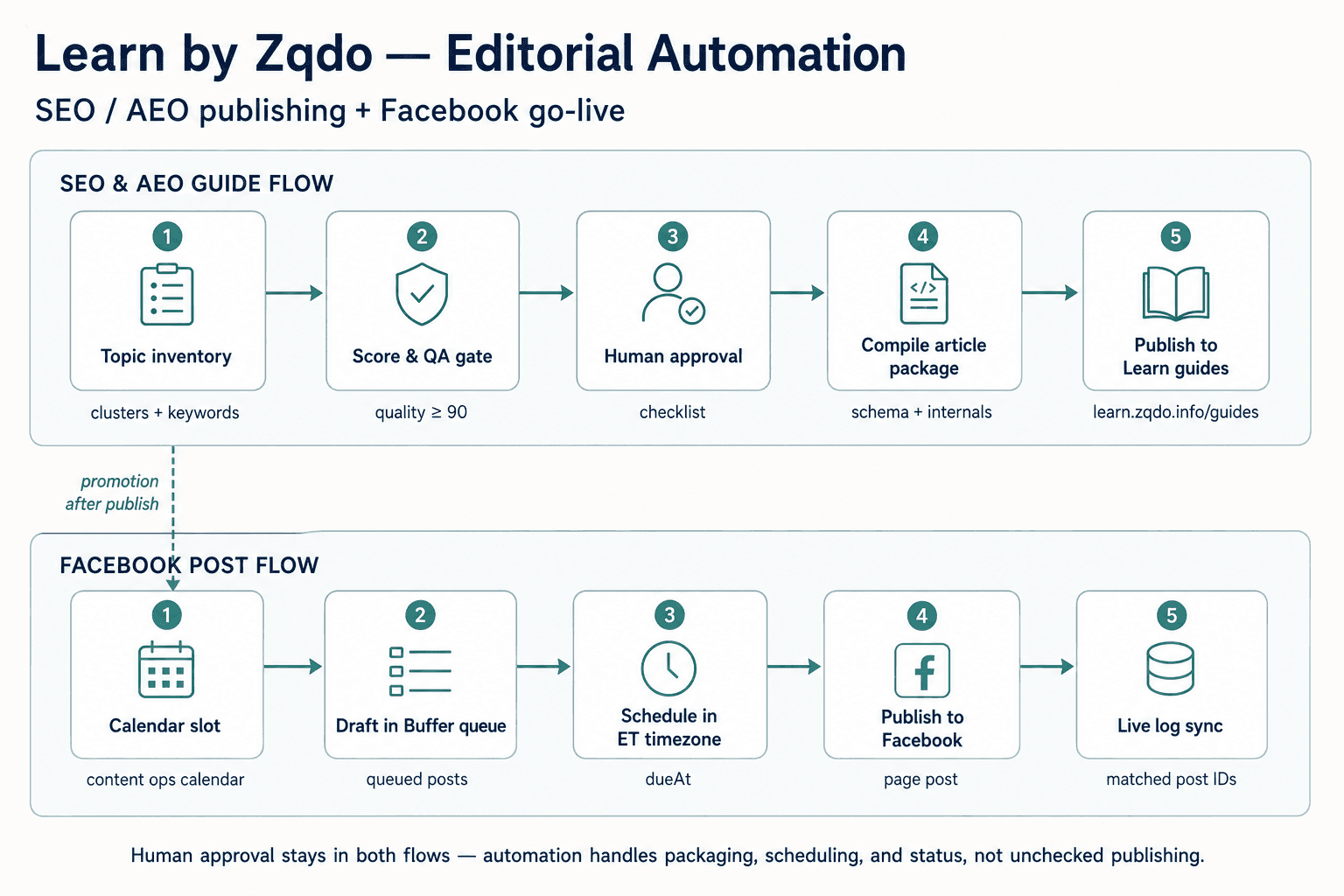
Zqdo built the editorial automation stack behind Learn by Zqdo—topic scoring, QA scorecards, human approval gates, article package publishing, and Buffer-integrated social workflows for Shopify knowledge-base content.
This is an automation engagement. Scoring, packaging, scheduling, and an internal ops view run as a system. Publishing still waits on human approval.
Read the Learn by Zqdo project
A business workflow, not an AI project
Suntree Business Center
For Suntree Business Center, Zqdo redesigned the website for potential tenants, improved SEO structure, and set up software so tenants could book conference rooms without emailing the office directly.
Suntree’s engagement covered a website redesign, SEO structure, conference-room booking, and a clearer path for maintenance requests. It shows operational workflow work. It was not an AI automation project.
Read the Suntree Business Center project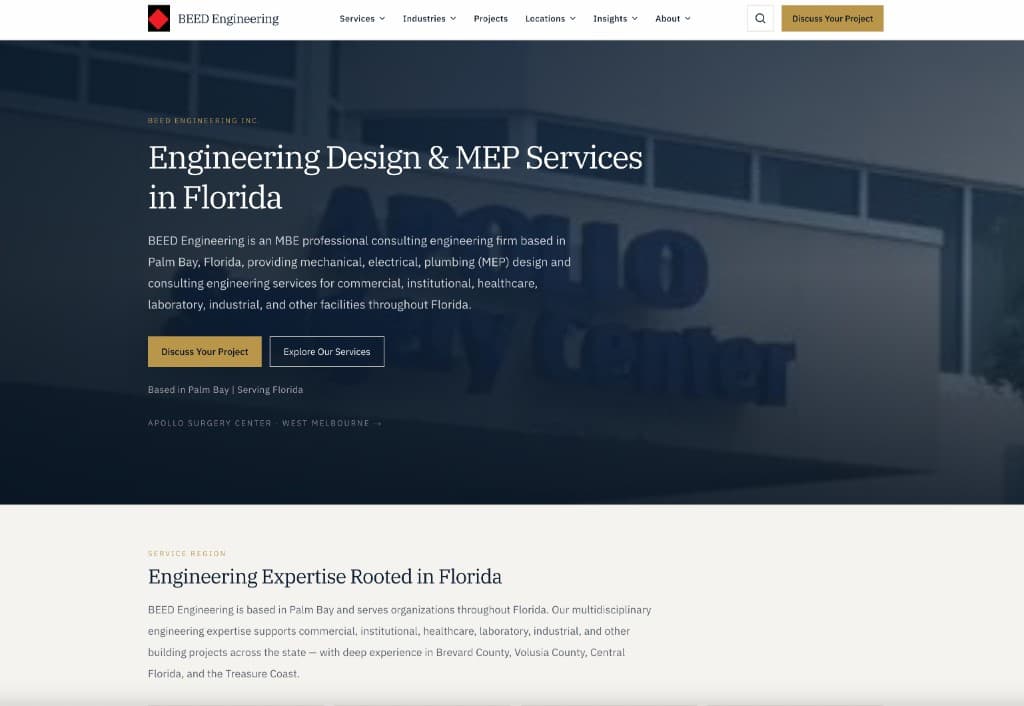
The website and search layer automation connects to
BEED Engineering
BEED Engineering had decades of project experience, but the old website was not turning that proof into inquiries. In approximately the first three months, the new site received 42 clicks from Google Search and 16 contact form submissions. The previous site produced nearly 0.
BEED Engineering’s rebuild organized services, locations, and project proof so prospects and search engines could use them. That is website and local-search work. It is included because lead automation is only useful when the site that captures demand is clear.
Read the BEED Engineering project
Technical storefront work that keeps the path reliable
Tennis Express
For Tennis Express, Zqdo audited and optimized Shopify storefront performance—diagnosing JavaScript and third-party script costs, LCP issues, and resource prioritization problems that were holding Core Web Vitals back.
Tennis Express work focused on performance, third-party scripts, and real-user errors. It is not an AI case study. It is proof that Zqdo will look at the systems a customer journey actually runs on.
Read the Tennis Express project
Looking for a workflow like the lead follow-up, intake, reporting, or Shopify routing examples above? We can begin with an automation audit and identify the most practical first implementation. We do not have a public client case study for those exact workflows yet, so we will not invent one.
What it is like to work with Zqdo
These comments are from website and Shopify projects. They describe how David works with a client. They are not results from an AI automation engagement.
“David consistently demonstrated dedication and professionalism during his tenure with Popmenu. In his role as a web designer, he managed multiple projects with diligence and a positive attitude, which our team genuinely appreciated. His eagerness to learn and enhance his skills was evident in his continuous improvement and receptiveness to constructive feedback.”
Vanessa Bach
Web design & project delivery, Popmenu
“David is very professional. Being a beginner, there are things you just can’t do completely by yourself – David was able to understand exactly what I was looking for very quickly, and to deliver exactly the result I was expecting in no time. He also provided a lot of details on his work, allowing me to fully understand what’s been done.”
Antoine
Shopify UX & custom development, Maison Protéine
“David is a true professional in web development. He meticulously resolved issues with my Shopify store, showcasing a deep understanding of technical matters. His responsive and empathetic approach greatly eased the process. His willingness to help and reliability stood out, making me feel confident about the project.”
Team
Shopify technical problem-solving, 1min1book.com
Start here
Find the First Workflow Worth Automating
The best first automation is usually not the biggest. It is the one that removes a real bottleneck, is easy to measure, and gives your team confidence in the process. Tell us the workflow, the tools you already use, and where the team loses time.

Reviewed by David Frempong, Founder & Digital Consultant
David Frempong reviews this service. He is a hands-on web and Shopify developer who implements the websites, forms, analytics, and tool connections these workflows depend on. Relevant credentials include Salesforce Certified Platform Administrator, Klaviyo Product Certification, Google Analytics 4, and HubSpot AEO Fundamentals.
Last updated November 3, 2026
Questions
AI Automation Services FAQs
What is AI automation?
AI automation combines standard workflow automation with AI capabilities such as summarizing, categorizing, drafting, searching approved information, and interpreting unstructured text. A reliable solution often uses both fixed rules and AI, depending on the task.
What can AI automation help my business do?
It can help automate repetitive processes such as lead routing, follow-up, intake, customer support triage, reporting summaries, content operations, ecommerce tasks, and internal handoffs. The best use case depends on your business process and systems.
Will AI automation replace my team?
The goal is typically to remove repetitive work and help your team respond faster and more consistently. People should remain responsible for strategy, relationships, sensitive decisions, and quality control. The workflow is configured to support your team—not replace accountability.
Can you automate leads from my website?
Yes. We can help connect forms, chat, booking tools, email, CRM systems, and internal alerts so leads are captured, routed, and followed up on more reliably. Pricing, promises, and the final sales conversation stay with a person.
Can you connect AI automation with Shopify?
Yes. Shopify stores can benefit from automations for customer-service routing, post-purchase communication, operational notifications, segmentation support, product-content workflows, and connections to CRM, email, and support tools. Shopify Flow covers many rule-based jobs. Custom API work is for the gaps Flow cannot reach.
What tools do you use?
The right tools depend on the client’s current systems. We can evaluate native integrations, workflow tools such as Zapier or Make, APIs, and AI platforms based on reliability, security, cost, and the specific business need. We do not start by replacing a stack that already fits.
How long does an AI automation project take?
A focused workflow may be scoped and implemented faster than a larger multi-system process. Timing depends on the complexity of the workflow, data quality, required integrations, approvals, and testing requirements. Implementation depends on your existing systems, data quality, tools, and use case.
How do you keep AI automation accurate?
We define approved inputs, instructions, data sources, review steps, escalation rules, and testing before launch. Automation should be monitored and improved over time rather than treated as permanently finished. Outputs that customers or clients will see go through approval when the message is sensitive or public.
Do you work with businesses in Central Florida?
Yes. Zqdo is based in Melbourne, Florida, and works with businesses in Brevard County, Orlando, and the rest of Central Florida, as well as remote teams. Local knowledge helps with service-business lead handling. The workflow design is the same if your team is elsewhere.
Keep reading
Guides that sit next to this service
These are published Learn by Zqdo resources. They explain the adjacent problems. They do not replace a scoped workflow.
- Learn AI hubPractical guides on AI search and how businesses get found.
- Shopify Flow automationsHow Flow handles repeatable store operations without adding storefront weight.
- Why a website is not generating leadsA website audit-style checklist before you automate a form nobody completes.
- Shopify AIStore operations, content, and automation topics for ecommerce teams.
- Show up in AI searchVisibility work that pairs with follow-up, without promising a ranking.