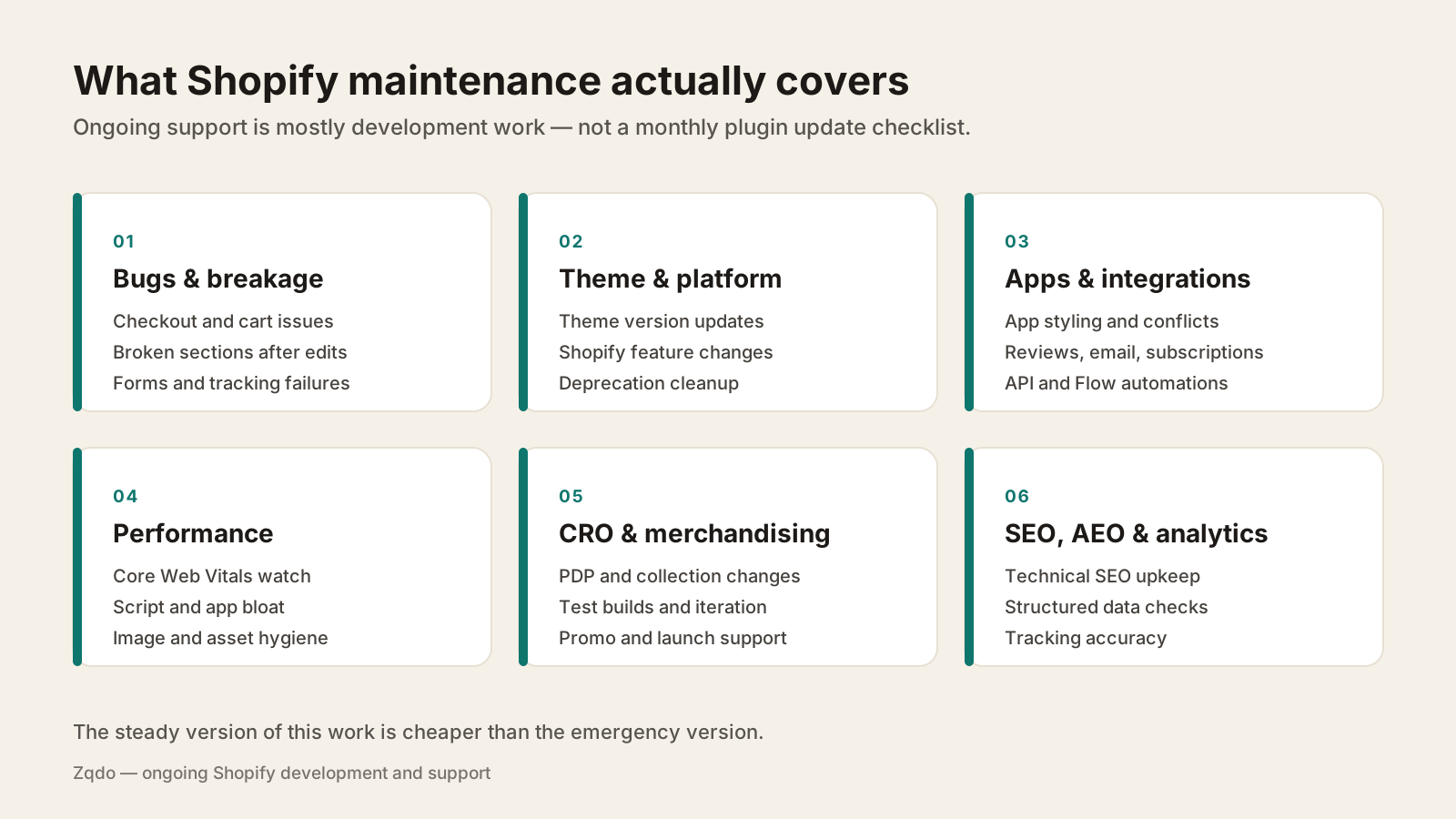
What ongoing Shopify maintenance and support actually covers—bug fixes, theme and platform updates, app and integration work, performance, CRO, SEO, and the steady development capacity a growing store needs.
How We Connected Shopify, GitHub & Noibu to Track Every Store Update (Catch Bugs and Issues Faster)
Prefer reading? Continue below.
Quick Answer
Shopify maintenance is the ongoing development and support work that keeps a store working and improving after launch: fixing bugs, keeping the theme and apps current, watching performance and tracking accuracy, and shipping small changes as the business evolves. Shopify handles hosting, security, and platform updates—so store maintenance is mostly development work, not server administration. Stores are not set-and-forget; themes, apps, integrations, and merchandising all drift, and unattended drift eventually shows up as lost revenue.
Shopify takes care of hosting, PCI compliance, security patching, and platform upgrades—which is exactly why people assume a Shopify store needs no maintenance. What Shopify does not manage is your theme, your apps, your integrations, your tracking, or the small changes your team requests every week. That layer drifts constantly, and it is where store maintenance actually lives.
The stores that stay fast, accurate, and conversion-healthy over time are the ones with a steady development rhythm. The stores that break in expensive ways are usually the ones where nobody owned that layer between projects. This guide covers what ongoing Shopify support includes, why it matters, and what a realistic retainer arrangement looks like.
What Does Shopify Maintenance Include?
Shopify maintenance covers six recurring categories of work: bug fixes and breakage, theme and platform updates, apps and integrations, performance, CRO and merchandising support, and SEO, AEO, and analytics upkeep. Most of it is development work rather than the server and plugin routine people associate with maintenance on other platforms.
Ongoing Shopify support is mostly development capacity applied across six recurring categories.
Bug fixes and breakage
The unglamorous core of maintenance. Cart and checkout edge cases, sections that break after a theme setting change, contact forms that silently stop delivering, discount rules that behave unexpectedly, and layout problems on specific devices. Speed matters here—a contact form that quietly stops sending or a broken add-to-cart costs money for every hour it stays broken.
Theme and platform updates
Themes ship updates for bug fixes, new features, and Shopify platform changes. Applying them to a customized theme is a merge exercise, not a button click, which is why so many stores fall years behind. Shopify itself keeps evolving too—checkout extensibility, customer accounts, Functions, and metaobjects have all changed what stores should be doing. Falling behind quietly narrows your options later.
Apps and integrations
Apps update on their own schedules and occasionally conflict with each other or your theme. Review widgets, subscription tools, email platforms, loyalty apps, and upsell apps all inject markup and scripts that need periodic attention. Integrations with an ERP, 3PL, or CRM need monitoring for sync failures that will otherwise be discovered by a customer. The Shopify apps hub goes deeper on managing that surface.
Performance monitoring
Performance decays. Every new app, tracking script, hero video, and font weight adds load, and the decline is gradual enough that nobody notices until a quarterly report does. Ongoing maintenance means periodic Core Web Vitals checks, script auditing, and image hygiene—the practices in how to speed up a Shopify store applied continuously rather than once a year.
CRO and merchandising support
Product launches, seasonal campaigns, landing pages, PDP iterations, and test builds all need development hands. Conversion work in particular is iterative—hypothesis, build, measure, adjust—which is why it fits a retainer better than a project. The Shopify CRO hub covers the testing side.
SEO, AEO, and analytics upkeep
Technical SEO drifts as content and templates change: broken internal links, orphaned collection pages, structured data that stops validating, redirects that never got cleaned up. Tracking drifts too—pixels break, GA4 events stop firing, and marketing decisions get made on bad data. Both need periodic verification rather than blind trust.
Development requests
The rest is simply capacity: new sections, metafield work, Flow automations, B2B rules, and the steady stream of changes a growing business needs. This is usually the largest share of a retainer.
Why Shopify Stores Need Ongoing Maintenance
Because everything around your theme keeps moving even when you do not touch it. Shopify ships platform changes, apps update, browsers change, third-party scripts get heavier, your catalog grows, and your team edits content in the theme editor. A store is a living system with several vendors pushing changes into it.
Apps and theme code interact in ways that are only discovered in production.
Performance degrades gradually as scripts, media, and features accumulate.
Tracking breaks quietly, and bad data is worse than no data.
Shopify platform changes create deprecations and new capabilities you should adopt deliberately.
Merchandising and content edits by non-developers can break layouts or SEO structure.
Small unaddressed problems compound into technical debt that raises the cost of every future project.
Shopify Maintenance vs. One-Time Development
Project work has a defined scope, a start, and an end. Maintenance is continuous capacity with prioritization instead of a fixed scope. Most stores need both—projects to make structural change, ongoing support to keep the store healthy and improving between them.
Dimension
One-time development
Ongoing maintenance
Scope
Fixed and defined up front
Prioritized backlog that evolves
Billing
Per project or milestone
Recurring monthly
Response time
Scheduled into the project plan
Agreed turnaround for urgent issues
Store knowledge
Rebuilt each engagement
Retained and compounding
Best for
Redesigns, migrations, new functionality
Iteration, fixes, testing, upkeep
Risk profile
Large change in a short window
Small changes, continuously verified
Continuity is the underrated part. A developer who already knows your theme, your apps, and your quirks solves problems in a fraction of the time it takes someone reading the codebase for the first time. That familiarity is a real cost saving, and it is the main argument for retaining capacity rather than re-scoping every request. For project-side pricing context, see the Shopify development cost guide.
What Does a Shopify Maintenance Retainer Look Like?
Retainers are usually structured one of a few ways, and the right structure depends on how predictable your workload is and how urgent your issues tend to be.
Hour blocks: a set number of development hours each month, applied to whatever is highest priority.
Defined scope: an agreed recurring set of responsibilities—monitoring, updates, and a defined support surface.
Priority support: guaranteed response times for urgent issues, often alongside an hour block.
Fractional web leadership: senior ownership of the storefront roadmap, not just ticket execution.
Whatever the structure, the arrangements that work share a few traits: a clear intake process so requests do not arrive across four channels, an agreed prioritization method, defined response expectations for urgent versus routine work, and visibility into what was shipped. Ask how unused hours are handled and how urgent work is defined before you sign anything.
Zqdo scopes ongoing support around what a store actually needs rather than a published tier list—store complexity, traffic, integration depth, and how much change your team pushes each month all affect the right arrangement. The website maintenance service page covers how engagements are structured.
Who Needs Shopify Maintenance?
Not every store needs a retainer. A small catalog on a stock theme with few apps and rare changes can get by with occasional help. Ongoing support earns its cost in these situations.
Growing brands where the store changes weekly and revenue depends on it staying correct.
Teams without an internal developer, where marketing is currently editing theme code by hand.
Marketing teams that need landing pages, tests, and campaign support shipped on their timeline.
Agencies needing additional Shopify development capacity for client work.
Complex stores with subscriptions, B2B, custom functionality, or deep integrations.
High-traffic stores where an hour of breakage is expensive.
Tushbaby — outsourced web leadership covering performance, CRO, product page architecture, and A/B testing over time.
A representative month of support work usually looks something like this—a mix of fixes, small builds, and verification.
Fix a section that broke after a theme editor change or an app update.
Style a third-party app widget so it matches the theme instead of looking bolted on.
Build a landing page or campaign template for a launch.
Add or adjust metafields and the template logic that displays them.
Diagnose a tracking discrepancy between Shopify, GA4, and an ad platform.
Audit and remove scripts left behind by uninstalled apps.
Build a Shopify Flow automation for tagging, fulfillment holds, or internal alerts.
Ship a product page change and set up the test to measure it.
Update the theme to a newer version while preserving customizations.
Fix redirects, broken internal links, or structured data that stopped validating.
Shopify Maintenance Checklist
A practical rhythm for stores without an internal developer. Adjust the cadence to your traffic and how often your team ships changes.
Weekly: check for storefront errors, failed integrations, and reported bugs; confirm forms and key flows still work.
Weekly: place a live test order or walk the full purchase path, including a discount code.
Monthly: review Core Web Vitals and page speed on mobile for home, collection, and top product templates.
Monthly: audit installed apps—usage, cost, script weight, and whether any can be removed.
Monthly: verify analytics and pixels are firing and reconcile against Shopify order data.
Monthly: review Search Console for crawl errors, indexing changes, and broken pages.
Quarterly: evaluate theme updates and Shopify platform changes, and plan adoption deliberately.
Quarterly: clean up dead code, unused snippets, and leftover scripts from removed apps.
Quarterly: review structured data, redirects, and internal linking after content changes.
Before peak season: freeze risky changes, load test the critical path, and confirm rollback options.
Continuously: keep a prioritized backlog so improvement work is not crowded out by fixes.
Shopify Maintenance Case Studies
Ongoing Zqdo engagements look different depending on the store—some are continuous leadership, some are contracted capacity for agencies, and some are focused technical work that keeps a specific system healthy.
American Barbell — contracted Shopify development support for Minion Made covering performance and customer journey work.
✓Shopify handles hosting, security, and platform updates—store maintenance is mostly development work on your theme, apps, and integrations.
✓Ongoing support spans six categories: bugs, theme and platform updates, apps and integrations, performance, CRO and merchandising, and SEO, AEO, and analytics.
✓Performance and tracking degrade quietly; both need periodic verification rather than assumption.
✓Retained capacity is cheaper per change than repeated one-off scoping, largely because store knowledge compounds.
✓Retainers are typically structured as hour blocks, defined scope, priority support, or fractional web leadership.
✓A good retainer has a roadmap, not just a reactive queue.
✓Small unaddressed issues become technical debt that raises the cost of every future project.
Frequently Asked Questions
What does Shopify maintenance include?+
Bug fixes and breakage response, theme and Shopify platform updates, app and integration management, performance monitoring, CRO and merchandising support, SEO and analytics upkeep, and general development capacity for new sections, metafields, and automations.
Does Shopify handle maintenance for me?+
Shopify manages hosting, security, PCI compliance, and platform upgrades. It does not manage your theme code, app conflicts, integrations, tracking accuracy, or the changes your team requests. That layer is what store maintenance covers.
How much does Shopify maintenance cost?+
Ongoing support is usually billed monthly, either as a block of development hours or a defined scope of responsibilities. Cost depends on store complexity, traffic, integration depth, response time expectations, and how much change your team ships each month. Retained capacity typically costs less per change than one-off scoping.
Do I need a Shopify maintenance retainer?+
It depends on how much your store changes and how much revenue depends on it. Growing brands, teams without an internal developer, marketing teams shipping campaigns, agencies needing capacity, and complex or high-traffic stores benefit most. A small catalog on a stock theme with rare changes may only need occasional help.
How often should a Shopify store be updated?+
Check for errors and verify the purchase path weekly. Review performance, apps, analytics, and Search Console monthly. Evaluate theme updates and Shopify platform changes quarterly, and freeze risky changes before peak season.
What happens if I do not maintain my Shopify store?+
Problems accumulate rather than announce themselves: slower pages, broken tracking, app conflicts, outdated theme code, and drifting SEO structure. The visible symptom is usually a conversion or traffic decline months later, and the fix costs more than steady upkeep would have.
Can Shopify maintenance include development work?+
Yes—for most stores that is the majority of it. New sections, metafield work, Flow automations, landing pages, app customizations, and test builds are all normal retainer work alongside fixes and monitoring.
Can an agency use Zqdo for Shopify maintenance capacity?+
Yes. Zqdo has delivered contracted Shopify development support for agencies on client storefronts, including CH Premier and American Barbell through Minion Made, covering performance, integrations, and UX work.
Continue Learning
Related guides, real Zqdo project examples, and the category hub for deeper exploration.
David Frempong is the founder and digital consultant at Zqdo. He is a hands-on web developer and Shopify developer who helps ecommerce brands and local businesses improve their websites, integrations, SEO, AEO, analytics, and conversion performance.