Shopify Website Redesign: When and How to Redesign Your Store
How to tell whether your Shopify store needs a full redesign or targeted optimization, what the redesign process actually involves, and how to protect SEO and conversion rates while you ship.
How to Build a High Converting Landing Page for Shopify
Prefer reading? Continue below.
Quick Answer
You need a Shopify redesign when the structure itself is the problem: the theme cannot support how you sell, the codebase is too tangled to change safely, or the brand and information architecture no longer match the business. If the issue is a handful of underperforming templates, slow load times, or unclear product pages, targeted optimization is usually faster, cheaper, and lower risk than a rebuild. Redesign what is structurally broken; optimize what is merely underperforming.
Most Shopify redesign requests start with a feeling rather than a diagnosis—the store looks dated, a competitor launched something slicker, or conversion has drifted down and a rebuild feels like the reset button. Sometimes that instinct is right. Often it is expensive, and the same money spent on product pages, speed, and merchandising would have moved revenue faster.
This guide is about making that call deliberately: the signals that genuinely justify a redesign, what the process looks like when it is run properly, and the specific steps that keep search rankings and conversion rates intact through a relaunch. For budget context, pair it with the Shopify development cost guide.
When Do You Actually Need a Shopify Redesign?
You need a redesign when the constraint is structural. That means the theme's architecture blocks how you want to merchandise, the code has accumulated enough debt that ordinary changes are risky, or the brand and navigation no longer reflect the catalog you actually sell. Aesthetic fatigue on its own is not a structural problem—and it is the most common reason brands overspend.
A useful framing: a redesign changes the system your store is built on. Optimization changes what happens inside that system. If you can name the specific pages and behaviors that are underperforming, you probably want optimization. If you cannot make those changes without fighting the theme, you want a redesign.
Signs Your Shopify Store Needs a Redesign
These are the patterns that reliably indicate the structure—not the surface—is the problem.
The theme is an older, non-sectioned build, so every content change requires developer time.
Layered customizations from multiple developers make routine edits unpredictable and slow.
Mobile experience is fundamentally awkward rather than fixable with targeted CSS and layout work.
Navigation and information architecture no longer match a catalog that has grown or shifted.
The store cannot support what the business now needs: B2B, subscriptions, bundles, or a much larger catalog.
Performance problems trace to theme architecture and script loading rather than a few heavy images.
Brand positioning has changed meaningfully and the storefront still communicates the old one.
Your team avoids touching the site because something always breaks.
Notice what is absent from that list: “the homepage looks old.” A dated homepage is a design refresh, and design refreshes can often ship as a phase inside your existing theme.
Redesign vs. Optimization: Which Do You Need?
Zqdo does not default to recommending a rebuild. In plenty of engagements the right answer has been targeted work—faster pages, better product page architecture, cleaner merchandising—because that preserves the search equity and conversion behavior you have already paid for. A rebuild resets both.
Situation
Better fit
Why
Product pages convert poorly but traffic is healthy
Optimization
PDP structure, proof, and mobile friction are template-level fixes
Slow mobile load on a modern theme
Optimization
Usually scripts, apps, and images—not architecture
Theme cannot support new selling models
Redesign
Requires new templates, data structure, and often new sections
Every change risks breaking something else
Redesign
Technical debt has become the recurring cost
Brand refresh with the same catalog and structure
Design refresh inside the current theme
Visual system can change without rebuilding templates
Migrating from another platform or a headless setup
Redesign
Data mapping, URLs, and templates all change anyway
Tushbaby — outsourced web leadership covering performance, CRO, PDP architecture, and A/B testing.
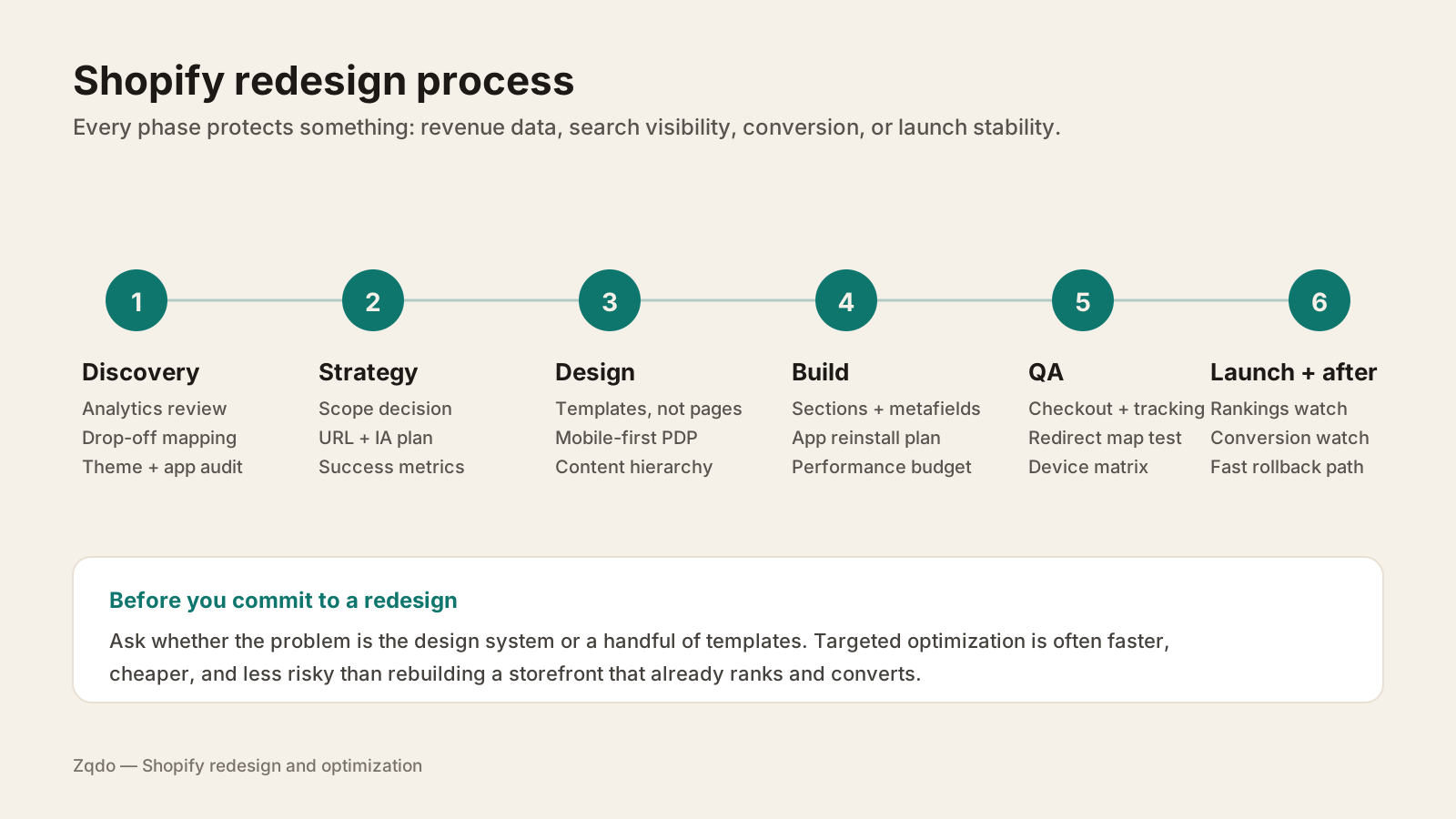
A redesign that protects revenue runs in phases, each with a defined output. Skipping discovery is the most common reason a new store launches prettier and converts worse.
Each phase protects something specific—revenue data, search visibility, conversion behavior, or launch stability.
1. Discovery and audit
Establish what currently works before you replace it. That means analytics review by template and device, drop-off mapping through the funnel, an inventory of every installed app and what it touches, a look at the theme's actual code condition, and a list of the pages that earn organic traffic today.
2. Strategy and scope
Decide what is being rebuilt and what is being carried over. Lock the URL structure and information architecture here, because that decision drives the redirect plan later. Define the metrics that will judge the project—conversion by template, mobile load time, organic sessions on key landing pages—so success is not a matter of opinion after launch.
3. Design
Design templates, not pages. A Shopify storefront is a system of product, collection, cart, and content templates with reusable sections. Design mobile-first, because that is where most sessions and most friction live, and keep the elements that already convert unless you have a reason to change them.
4. Build
Build as proper sections and blocks so your team can merchandise without a developer. Model product data with metafields rather than hardcoding it into templates. Plan app reinstallation deliberately—this is the best opportunity you will get to drop apps you no longer need. Set a performance budget during the build rather than auditing speed after launch.
5. QA
Test the money path first: add to cart, cart, checkout, discounts, shipping rates, and every payment method you accept. Verify tracking end to end—Shopify Analytics, GA4, ad platform pixels, and email flows. Walk the redirect map. Test on real devices, not just a resized browser window.
6. Launch and post-launch
Launch when you can watch it—not on a Friday afternoon or the week of a major promotion. Then monitor deliberately for the first several weeks: crawl errors and indexing in Search Console, rankings on your top landing pages, conversion by template, and support tickets, which often surface UX problems before analytics does. Keep a rollback path available.
How Much Does a Shopify Redesign Cost?
Redesigns sit at the higher end of Shopify project pricing because they touch the whole template system, not one feature. Cost scales with catalog size and complexity, how much custom functionality carries over or gets rebuilt, whether design is custom or adapted from a theme's system, whether a migration is involved, and how thorough the QA and SEO protection work is.
Catalog size and variant complexity drive template and filtering work.
Custom functionality has to be rebuilt or replaced, and specification takes time.
Custom design costs more than adapting an existing theme's design system.
Migrations add data mapping, URL planning, and redirect work.
Integrations—ERP, PIM, 3PL, subscriptions, reviews—need retesting after launch.
Content production is frequently underestimated and often sits with your team.
The full breakdown of tiers, cost drivers, and how to get an accurate quote is in the Shopify development cost guide. One planning note worth stating plainly: budget for the weeks after launch, not just up to it. Post-launch fixes and monitoring are part of the project, and ongoing support is what keeps a new store from drifting back into debt.
How to Redesign Shopify Without Losing SEO
Traffic loss after a relaunch is common and largely preventable. It usually comes from four things: URLs that changed without redirects, content that was quietly dropped, page structure that lost its heading and schema signals, and a slower site. Handle those and most redesigns hold their organic performance.
Inventory current URLs and export organic landing pages and rankings before any build starts.
Keep URL structures wherever you can. Every change you avoid is a redirect you do not have to maintain.
Build a complete 301 redirect map for anything that does change—products, collections, blog posts, and legacy pages—and test it before launch, not after.
Preserve content depth. Collection descriptions, buying guides, and FAQ content are often ranking assets, even when they look like clutter in a design comp.
Maintain heading hierarchy and on-page structure so topical signals survive the visual redesign.
Carry over structured data: product, breadcrumb, FAQ, and organization schema.
Keep title tags and meta descriptions mapped page to page unless you are deliberately improving them.
Protect load speed. A slower relaunch can cost rankings and conversion at the same time.
Keep internal linking intact—navigation, related products, and in-content links all carry weight.
Verify canonical tags, pagination, and faceted collection URLs, which are easy to break on Shopify.
Submit an updated sitemap and watch Search Console coverage and crawl stats closely after launch.
Do not deindex or block the store during development in a way that can persist into production.
Expect some short-term fluctuation even when everything is done right; search engines need to recrawl and reassess. What you should not accept is a sustained decline with no explanation. That usually points to a redirect gap or lost content.
Redesigning for Conversion Rate Optimization
A redesign is a chance to fix conversion problems—and also a chance to break things that were quietly working. The safest approach is to bring evidence into the design phase rather than treating the new store as a fresh guess.
Carry forward what data shows is working: proof placement, trust signals, and CTA patterns that already convert.
Design product pages around the buying decision—clarity above the fold, proof near the buy box, objections handled below.
Reduce variant and shipping confusion; these cause more abandonment than visual design does.
Keep the mobile add-to-cart path short, with tap targets and sticky CTAs that work one-handed.
Instrument the new templates so you can test after launch instead of relaunching again in a year.
If conversion is the primary motivation for the project, read the Shopify CRO hub and consider whether conversion rate optimization as an ongoing program gets you there faster than a rebuild. In many cases, structured testing on the store you already have produces results sooner.
B.fresh — Rebuy subscription widget customization and PDP UX work so the app UI matched the brand's theme.
New stores are not automatically fast. A redesign can easily ship slower than what it replaced if the design leans on large hero media, animation libraries, multiple font families, and every app carried over out of habit. Performance has to be a constraint during the build, not an audit afterward.
Set a performance budget in the strategy phase and hold design decisions to it.
Audit apps before relaunch and drop the ones you cannot justify—each one adds requests and script weight.
Handle images properly: correct dimensions, modern formats, and lazy loading below the fold.
Limit font families and weights, and load them without blocking render.
Defer non-critical JavaScript and keep third-party scripts off the critical path.
Test Core Web Vitals on staging and on a real mid-range phone, not just a fast desktop connection.
These Zqdo projects show the range between full structural change and targeted rework—including engagements delivered as contracted development support for agencies.
Maison Protéine — migration guidance, bundle app research, UX improvements, and a custom scroll-triggered section.
More projects across catalog size, platform, and engagement model are on the work page.
Shopify Website Redesign Checklist
Run this before, during, and after the project. Most redesign regrets trace back to a line item on it that got skipped.
Document current performance: conversion by template and device, mobile load time, organic landing pages, revenue by page.
Decide explicitly what is redesign and what is optimization, and write down why.
Inventory apps and integrations, and mark each one keep, replace, or remove.
Lock the URL and information architecture plan before design begins.
Design templates and sections, mobile-first, rather than one-off page comps.
Set a performance budget and hold the build to it.
Build with sections, blocks, and metafields so the team can merchandise independently.
Preserve content depth, headings, structured data, and internal links.
Build and test a complete 301 redirect map.
QA the full purchase path, payment methods, discounts, and shipping rates on real devices.
Verify analytics, pixels, and email flows before launch, then again after.
Launch on a low-traffic window with a rollback plan ready.
Monitor rankings, crawl errors, conversion, and support tickets for at least four to six weeks.
Book a post-launch iteration cycle—the first version is never the final one.
Key Takeaways
✓Redesign when the structure blocks you; optimize when specific templates underperform.
✓Aesthetic fatigue alone rarely justifies the cost and risk of a full rebuild.
✓Capture baseline conversion, speed, and organic traffic data before any build starts.
✓SEO loss at relaunch is preventable with URL planning, complete redirects, preserved content, and intact structured data.
✓A redesign can ship slower than the store it replaces unless performance is a build constraint.
✓Design templates and sections, not individual pages, so your team can merchandise without a developer.
✓Budget for the weeks after launch—monitoring and iteration are part of the project.
Frequently Asked Questions
How do I know if my Shopify store needs a redesign?+
Look for structural signals: an older non-sectioned theme, layered customizations that make edits risky, navigation that no longer fits your catalog, or an inability to support B2B, subscriptions, or catalog growth. If instead you can name specific underperforming templates, targeted optimization is usually the better investment.
Will a Shopify redesign hurt my SEO?+
It can, but the losses are largely preventable. Keep URLs where possible, build and test a complete 301 redirect map, preserve content depth and heading structure, carry over structured data, protect page speed, and monitor Search Console after launch. Expect brief fluctuation while pages are recrawled—not a sustained decline.
How long does a Shopify redesign take?+
Most redesigns run weeks to months depending on catalog size, custom functionality, integrations, and how much content and design work happens in parallel. Migrations extend the timeline. Content production is the phase most often underestimated.
How much does a Shopify redesign cost?+
Redesigns sit at the higher end of Shopify project pricing because they touch the entire template system. Cost scales with catalog complexity, custom functionality, custom versus adapted design, migration scope, and QA depth. See the Shopify development cost guide for tiers and cost drivers.
Should I redesign or just optimize my Shopify store?+
Optimize when the store's structure is sound and the problem is conversion, speed, or merchandising on specific templates. Redesign when the theme itself prevents the changes you need or when technical debt makes every change risky. A phased hybrid—rebuilding blocked templates while optimizing the ones that earn—often works best.
Will a redesign improve my conversion rate?+
Not automatically. Redesigns improve conversion when they are driven by evidence about where buyers hesitate and when the elements that already work are carried forward. A redesign based on taste alone can just as easily reduce conversion, which is why baseline measurement matters.
Can I redesign my Shopify store in phases?+
Yes, and it is often the lower-risk path. Rebuild high-impact templates such as product and collection pages first, measure the effect, then continue. Phasing keeps revenue pages under observation instead of changing everything at once.
What should I do right after a Shopify relaunch?+
Watch Search Console for crawl and indexing errors, track rankings on your top organic landing pages, compare conversion by template against your pre-launch baseline, verify analytics and pixels are firing, and read support tickets—customers surface UX problems faster than dashboards do.
Continue Learning
Related guides, real Zqdo project examples, and the category hub for deeper exploration.
David Frempong is the founder and digital consultant at Zqdo. He is a hands-on web developer and Shopify developer who helps ecommerce brands and local businesses improve their websites, integrations, SEO, AEO, analytics, and conversion performance.